- Home Page /
- Software /
- Utilities /
- File Conversion /
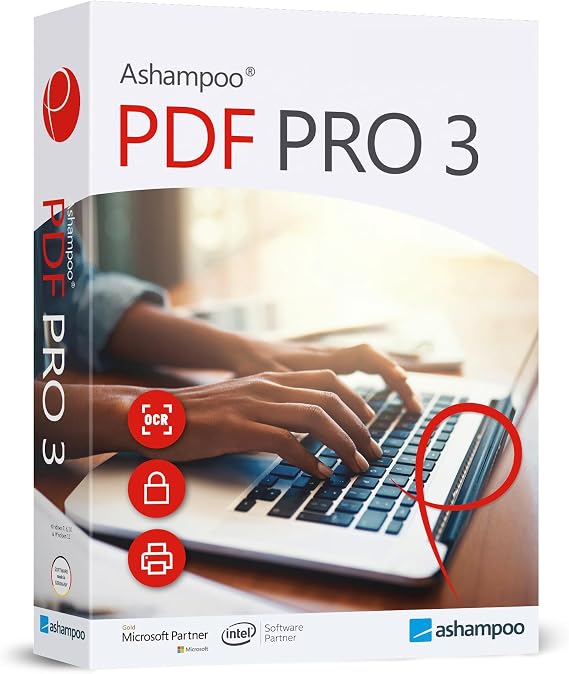
- PDF Pro 3 - PDF editor to create, edit, convert and mer...
0 ratings

Item #:
16794042
PDF Pro 3 - PDF editor to create, edit, convert and merge PDFs - 100% Compatible with Adobe Acrobat - for Windows 11, 10, 8.1, 7
Item #:
16794042
GHS 683
Price Details
Excluding Shipping & Custom charges ( Shipping and custom charges will be calculated on checkout )
*All items will import from US
0 ratings
Write a review
Out of stock
 Imported from USA store
Secured transaction
Ubuy works hard to protect your security and privacy. Our advanced payment security system ensures confidentiality by encrypting your information during transmission using AES (Advanced Encryption Standards) and SSL (Secure Socket Layer) protocols. Your payment details are 100% secure as we do not share your payment details with third party sellers.
Our Top Logistics Partners


The all-in-one solution for PDF editing.

Fast
Shipping

Free
Return*

Secure Packaging

100% Original Products

PCI DSS Compliance

ISO 27001 Certified


Note: Step Down Voltage Transformer required for using electronics products of US store (110-120). Recommended power converters Buy Now.


What Stands Out
Comprehensive Editing
PDF Pro 3 offers advanced editing tools, allowing users to create, edit, convert, and merge PDFs effortlessly. This versatility addresses diverse user needs beyond basic PDF functionality.
Adobe Compatibility
Designed for full compatibility with Adobe Acrobat, PDF Pro 3 ensures seamless file handling, making it an ideal choice for professionals who require reliable integration with existing Adobe workflows.
User-Friendly Interface
With an intuitive interface, PDF Pro 3 enhances usability for all skill levels. Users can easily navigate features, reducing the learning curve and maximizing productivity for both casual and professional users.
Product Details
- All-in-one PDF solution for creating, editing, converting, and merging PDF files
- Maximum functionality including interactive forms, comparing PDFs, bates numbering, and OCR engine
- Easy installation and user-friendly interface with in-program instructions and free tech support
- Great value for individuals and companies with maximum functionality at a reasonable price
- System requirements: Windows 11, 10, 8, 7 (32 and 64-bit versions) with internet access for activation
- Features include creating interactive forms, comparing PDFs, image editing, find and replace colors, document protection, and more
| Item Weight | 0.5 lbs (230 grams) |
Who Should Buy?

-
Business Professionals
Ideal for users needing to create, edit, and manage PDFs for reports and presentations efficiently.
-
Students and Academics
Great for students requiring tools to annotate, modify research papers, and prepare assignments in PDF format.
-
Freelancers and Designers
Suitable for freelancers who need to compile and edit client documents or design portfolios in PDF format.

-
Mac Users
Not suitable for Mac users as it is primarily designed for Windows operating systems, limiting cross-platform usability.
-
Basic Users
Not ideal for users who only require basic PDF viewing without any editing or conversion functionality.
-
Large Enterprises
Lacks advanced features that larger businesses might require for extensive document management and collaboration.
Product Description
PDF Pro 3 - PDF editor to create, edit, convert and merge PDFs - 100% Compatible with Adobe Acrobat - for Windows 11, 10, 8.1, 7
Have any Query? Chat with us
Customer Questions & Answers
-
Question:
What features does PDF Pro 3 offer for PDF editing?
Answer: PDF Pro 3 provides an extensive range of features for PDF editing, including the ability to create, edit, convert, and merge PDFs seamlessly. Users can modify text and images, add annotations, and fill out forms easily. Additionally, it supports batch processing, allowing users to handle multiple files simultaneously, which is great for business professionals who require efficiency in document management. -
Question:
Is PDF Pro 3 compatible with other PDF software?
Answer: Yes, PDF Pro 3 is 100% compatible with Adobe Acrobat, ensuring that users can share and open PDFs without any format issues. This compatibility means that documents created or modified in PDF Pro 3 can be accessed by users on Adobe Acrobat without any loss of formatting. This is especially useful for businesses that need to collaborate on documents with clients or stakeholders who might be using different software. -
Question:
Can I convert PDFs to other file formats using PDF Pro 3?
Answer: Absolutely! PDF Pro 3 allows users to convert PDFs into various formats such as Word, Excel, and PowerPoint. This feature is invaluable for those who need to extract text or images from a PDF to use in presentations or reports. The conversion process is user-friendly and retains the original document’s layout, making it easy to work with converted files. -
Question:
Is PDF Pro 3 straightforward for beginners?
Answer: Yes, PDF Pro 3 has an intuitive user interface that is designed for both beginners and experienced users. The layout is simple to navigate, with clear menus and toolbars that let users quickly access editing, conversion, and merging functions. Beginners can take advantage of built-in tutorials and guides that help familiarize them with the software, making it accessible for any skill level. -
Question:
Does PDF Pro 3 allow for secure document handling?
Answer: PDF Pro 3 emphasizes document security, offering features such as password protection, watermarking, and redaction tools. These options help users manage sensitive information effectively, ensuring that only authorized users can access certain documents. Secure handling is crucial for businesses dealing with confidential information, making PDF Pro 3 a reliable choice for secure PDF management. -
Question:
What operating systems support PDF Pro 3?
Answer: PDF Pro 3 is compatible with a variety of Windows operating systems, including Windows 11, 10, 8.1, and 7. This wide compatibility makes it accessible for users who may not have the latest OS, thus allowing companies with mixed systems to uniformly adopt the software. It ensures that users can utilize the software regardless of their specific system requirements, enhancing overall productivity. -
Question:
Can I merge multiple PDFs into one document with PDF Pro 3?
Answer: Yes, PDF Pro 3 includes a powerful merging feature that allows users to combine multiple PDF files into a single document conveniently. This is particularly useful for professionals who need to compile reports, presentations, or client files. The process is straightforward—just select the PDFs you wish to merge, and the software seamlessly combines them while maintaining the original quality. -
Question:
Are there any limitations to the free trial of PDF Pro 3?
Answer: The free trial of PDF Pro 3 typically allows users to explore most features of the software, however, there may be restrictions on saving or exporting documents. This lets potential customers assess the software's capabilities without any initial commitment. Users who find it beneficial can then opt for the full version to unlock all functionalities, reinforcing the investment in their document management needs. -
Question:
What support options are available for PDF Pro 3 users?
Answer: PDF Pro 3 offers various support options to assist users, including online resources such as FAQs, tutorials, and customer service contact. For advanced issues, users can reach out to the support team via email or live chat for professional assistance. This comprehensive support network ensures that users can get help whenever needed, fostering a smooth experience while using the software. -
Question:
Where can I buy PDF Pro 3 in Ghana?
Answer: You can purchase PDF Pro 3 from Ubuy in Ghana. Ubuy is an authorized retailer that offers a range of software solutions, ensuring you get the original product with reliable service. By choosing Ubuy, you can easily download PDF Pro 3 and enjoy its full features for your PDF editing needs, all while benefiting from a user-friendly purchasing experience.
markt-technik File Conversion Editorial Review
No editorial reviews found
Customer Reviews & Ratings
1 customers ratings
-
5 Star
100%
-
4 Star
0%
-
3 Star
0%
-
2 Star
0%
-
1 Star
0%
Review this product
Share your thoughts with other customers
Product Price History
Important information
- Limitations : For products shipped internationally, please note that any manufacturer warranty may not be valid; manufacturer service options may not be available; product manuals, instructions, and safety warnings may not be in destination country languages; the products (and accompanying materials) may not be designed in accordance with destination country standards, specifications, and labeling requirements; and the products may not conform to destination country voltage and other electrical standards (requiring use of an adapter or converter if appropriate). The recipient is responsible for assuring that the product can be lawfully imported to the destination country. When ordering from Ubuy or its affiliates, the recipient is the importer of record and must comply with all laws and regulations of the destination country.
- Not all the products listed on Ubuy are for sale, as Ubuy is a global search engine. Products are subject to export/trade regulations.
GHS 683
Currently unavailable.
We don't know when or if this item will be back in stock.
This item is not restrict in my country.(Please click on above link if this item is not restrict in your country, So our team will review and allow.)
Secured transaction
Ubuy works hard to protect your security and privacy. Our advanced payment security system ensures confidentiality by encrypting your information during transmission using AES (Advanced Encryption Standards) and SSL (Secure Socket Layer) protocols. Your payment details are 100% secure as we do not share your payment details with third party sellers.
Our Top Logistics Partners
Fastest cross-border delivery
Features & Benefits
- Create, edit, convert, merge and protect PDF files with one software
- Maximum functionality with interactive forms, OCR engine and more
- Use on up to 3 computers with no expiry date or subscription
- Great value for money, perfect for both personal and company use
- Easy to install and use with well-structured user-interface and free tech support