- Home Page /
- Electronics /
- Computer Accessories /
- Computer Accessories & Peripherals /
- Computer Cable Adapters /
- Serial Adapters /
- USB to UART Converter Built-in FT232RL 6P Ser...
0 ratings

Item #:
182554163
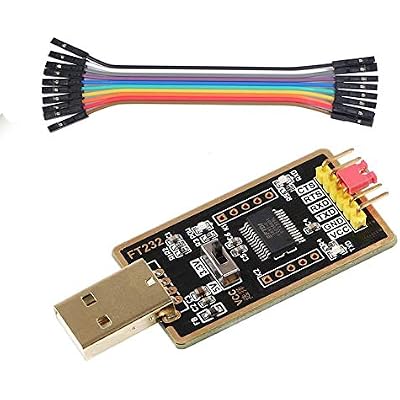
USB to UART Converter Built-in FT232RL 6P Serial Adapter, DIY USB to TTL Adapter for Programming Arduino Nano Raspberry Pi
Item #:
182554163
GHS 323
Price Details
Excluding Shipping & Custom charges ( Shipping and custom charges will be calculated on checkout )
*All items will import from US
0 ratings
Write a review
In stock
 Imported from USA store
QTY:
Order now and get it around Thursday, June 25
Secured transaction
Ubuy works hard to protect your security and privacy. Our advanced payment security system ensures confidentiality by encrypting your information during transmission using AES (Advanced Encryption Standards) and SSL (Secure Socket Layer) protocols. Your payment details are 100% secure as we do not share your payment details with third party sellers.
Our Top Logistics Partners


This USB TTL adapter is compatible with Windows 7, 8, 10, win11, and various Linux OS and Mac OS.

Fast
Shipping

Free
Return*

Secure Packaging

100% Original Products

PCI DSS Compliance

ISO 27001 Certified


Note: Step Down Voltage Transformer required for using electronics products of US store (110-120). Recommended power converters Buy Now.


What Stands Out
Wide Compatibility
Designed for seamless integration with Arduino Nano and Raspberry Pi, this converter supports various projects, empowering makers and hobbyists to easily program and communicate with their devices.
High Performance
Utilizing the reliable FT232RL chip, this adapter ensures stable and fast data transfer rates, minimizing programming errors and enhancing overall project efficiency for engineers and developers.
User-Friendly Design
The compact 6P layout enables straightforward connection, making it ideal for DIY enthusiasts. Its plug-and-play functionality allows even beginners to start their electronics projects with ease.
Product Details
| Compatible Devices | GPS |
| Connector Type | Serial Adapter |
| Number of Ports | 2 |
| Input Voltage | 5 Volts |
| Power Plug Type | No Plug |
| Smart Home Compatibility | Not Smart Home Compatible |
| Color | BLACK |
| Item Dimensions | 5.91 x 3.94 x 0.12 inches (15 x 10 x 0.3 cm) |
| Item Weight | 20 Grams |
| Package Quantity | 1 |
| Unit Count | 1.0 Count |
| Number of Items | 1 |
| Brand | Feanteek |
| Model Number | AD-232RL |
| UPC | 602638030031 |
| Manufacturer | Feanteek Technology |
| Item dimensions L x W x H | 5.91 x 3.94 x 0.12 inches (15 x 10 x 0.3 cm) |
Who Should Buy?

-
Arduino Developers
Great for programmers working on Arduino projects, allowing easy USB communication for debugging and programming.
-
Raspberry Pi Fans
Ideal for Raspberry Pi enthusiasts needing a simple method to connect to serial devices and peripherals.
-
DIY Electronics Hobbyists
Perfect for hobbyists interested in creating custom electronics and requiring a reliable serial connection solution.

-
Beginners
May be overwhelming for beginners lacking experience in electronics and programming without guidance.
-
High-Speed Applications
Not suitable for applications needing high-speed serial communication due to limited data transfer rates.
-
Non-Serial Devices
Inappropriate for users needing connections for non-serial devices or systems that do not utilize UART communication.
Product Description
USB to UART Converter Built-in FT232RL 6P Serial Adapter, DIY USB to TTL Adapter for Programming Arduino Nano Raspberry Pi
Have any Query? Chat with us
Customer Questions & Answers
-
Question:
What is a USB to TTL Adapter and what is it used for?
Answer: A USB to TTL Adapter converts USB signals from your computer to TTL serial signals, enabling communication between your computer and devices that use TTL logic levels. This is commonly used for programming microcontrollers, debugging serial devices, and interfacing with embedded systems. It's essential for scenarios where a direct USB connection isn't possible, such as with older hardware that requires TTL protocols. -
Question:
How do I connect the FEANTEEK USB to TTL Adapter to my device?
Answer: To connect the adapter, first, plug the USB end into your computer. Next, connect the 6P pin header to the TTL device using the correct pins, typically TX, RX, VCC, GND, and any other necessary control lines. Ensure that you match the signal levels correctly. This setup is ideal for programmers and engineers who want to upload code to DIY electronics or troubleshoot existing systems. -
Question:
Does the FEANTEEK USB to TTL Adapter support Linux and MacOS?
Answer: Yes, the FEANTEEK USB to TTL Adapter is compatible with multiple operating systems, including Windows, Linux, and MacOS. Most systems automatically detect the adapter and install the necessary drivers. This feature is beneficial for developers working in multi-platform environments and ensures that users can leverage the adapter across different operating systems without hassle. -
Question:
What are the key features of the FTDI USB TTL Adapter?
Answer: The FTDI USB TTL Adapter boasts several key features, including high data transfer rates, reliable performance facilitated by FTDI chip technology, and a compact design conducive to various projects. These features are essential for users needing stable and swift data transmission, making the adapter a perfect choice for tasks like serial communication in IoT devices or debugging hardware setups. -
Question:
Can the adapter be used for programming Arduino boards?
Answer: Yes, the FEANTEEK USB to TTL Adapter can be used to program Arduino boards, especially those without onboard USB ports. By connecting the adapter to the appropriate RX and TX pins, users can upload sketches directly to the Arduino. This application is particularly useful for customizing and debugging Arduino projects or for users building their own custom boards. -
Question:
What is the pinout configuration for the 6P 2.54mm connector?
Answer: The pinout for the 6P 2.54mm connector typically includes GND, VCC, TX, RX, and sometimes additional control signals like CTS and RTS. Following the correct configuration is critical to ensure reliable communication with your device. Understanding the pinout is essential for anyone wanting to integrate the adapter into their hardware project effectively. -
Question:
Is there any software required for using the USB to TTL adapter?
Answer: While the FEANTEEK USB to TTL Adapter connects easily with most computers, users may need terminal software such as PuTTY, Tera Term, or the Arduino IDE for communication. This software allows for the sending and receiving of data over the serial connection. It's particularly useful for developers who need to monitor outputs from their devices or send commands for programming purposes. -
Question:
What voltage levels does the FEANTEEK adapter support?
Answer: The FEANTEEK USB to TTL Adapter typically supports 3.3V and 5V TTL levels, making it versatile for various electronic projects. Choosing the appropriate voltage is crucial to ensure compatibility with your device and avoid potential damage. Users can switch between these levels depending on the requirements of their projects involving different microcontrollers and sensors. -
Question:
How do I troubleshoot common issues with the USB to TTL Adapter?
Answer: Common troubleshooting steps include checking connections, verifying pin assignments, ensuring the correct drivers are installed, and selecting the right COM port in your software. If communication fails, consider testing with a different USB cable or port. These methods are useful for users encountering issues when interfacing the adapter with their devices. -
Question:
Where can I buy the FEANTEEK USB to TTL Adapter in Ghana?
Answer: You can purchase the FEANTEEK USB to TTL Adapter from Ubuy, which offers a wide range of electronic components and accessories. Ubuy is a reliable online platform known for its efficient service and diverse product selection. It's an excellent option for anyone looking to quickly acquire this adapter for their programming and debugging needs.
Feanteek Serial Adapters AD-232RL Editorial Review
No editorial reviews found
Customer Reviews & Ratings
1 customers ratings
-
5 Star
0%
-
4 Star
100%
-
3 Star
0%
-
2 Star
0%
-
1 Star
0%
Review this product
Share your thoughts with other customers
Pros
- Easy to use
- Compact design
- Reliable connection
- Fast data transfer
- Compatible with multiple devices
Cons
- Limited cable length
Product Price History
Important information
- Limitations : For products shipped internationally, please note that any manufacturer warranty may not be valid; manufacturer service options may not be available; product manuals, instructions, and safety warnings may not be in destination country languages; the products (and accompanying materials) may not be designed in accordance with destination country standards, specifications, and labeling requirements; and the products may not conform to destination country voltage and other electrical standards (requiring use of an adapter or converter if appropriate). The recipient is responsible for assuring that the product can be lawfully imported to the destination country. When ordering from Ubuy or its affiliates, the recipient is the importer of record and must comply with all laws and regulations of the destination country.
- Not all the products listed on Ubuy are for sale, as Ubuy is a global search engine. Products are subject to export/trade regulations.
GHS 323
Order now and get it around Thursday, June 25
This item is not restrict in my country.(Please click on above link if this item is not restrict in your country, So our team will review and allow.)
QTY:
Secured transaction
Ubuy works hard to protect your security and privacy. Our advanced payment security system ensures confidentiality by encrypting your information during transmission using AES (Advanced Encryption Standards) and SSL (Secure Socket Layer) protocols. Your payment details are 100% secure as we do not share your payment details with third party sellers.
Our Top Logistics Partners
Fastest cross-border delivery
Features & Benefits
- Compatible with major operating systems including Windows, Linux, and Mac.
- Supports high-speed data transfer up to 921600bps.
- Features a built-in FT232RL IC for reliable performance.
- Offers both 3.3V and 5V logic options with a simple switch.
- Essential for programming routers, ESP8266 modules, and more.
- Includes all necessary components for immediate use.