- Home Page /
- Office Products /
- Office Electronics /
- Point-of-Sale (POS) Equipment /
- Receipt Printers /
- Phomemo M02 Mini Sticker Printer - Bluetooth ...
0 ratings







Item #:
23471935
Phomemo M02 Mini Sticker Printer - Bluetooth Thermal Printer with 3 Rolls White Sticker Paper, Compatible with iOS + Android for Learning Assistance,
Item #:
23471935
GHS 934
Price Details
Excluding Shipping & Custom charges ( Shipping and custom charges will be calculated on checkout )
*All items will import from US
33%
0 ratings
Write a review
In stock
 Imported from USA store
Secured transaction
Ubuy works hard to protect your security and privacy. Our advanced payment security system ensures confidentiality by encrypting your information during transmission using AES (Advanced Encryption Standards) and SSL (Secure Socket Layer) protocols. Your payment details are 100% secure as we do not share your payment details with third party sellers.
Our Top Logistics Partners


Phomemo M02 Pocket Printer- Mini Bluetooth Thermal Printer is portable and stylish with a one-click printing feature and direct thermal printing, making it ideal for printing photos and notes anywhere.
This bundle contains 2 items


Fast
Shipping

Free
Return*

Secure Packaging

100% Original Products

PCI DSS Compliance

ISO 27001 Certified


Note: Step Down Voltage Transformer required for using electronics products of US store (110-120). Recommended power converters Buy Now.


What Stands Out
Compact Design
The Phomemo M02 is ultra-portable, easily fitting into pockets or bags, making it convenient for on-the-go printing of labels, notes, and photos.
Bluetooth Connectivity
Seamlessly connect via Bluetooth to print directly from smartphones or tablets, allowing for easy and quick access to printing from various devices.
Sticker Paper Included
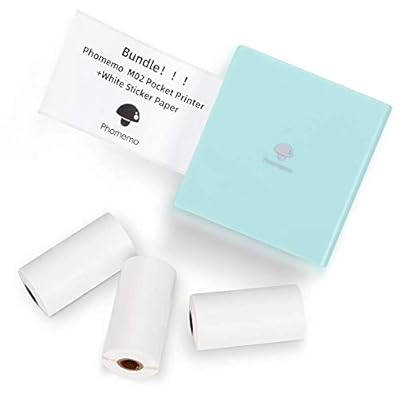
Comes with three rolls of white sticker paper, enabling immediate use and creativity in printing personalized stickers or labels without additional purchases.
Product Details
- Mini Bluetooth thermal printer with 3 rolls white sticker paper
- Bluetooth 4.0 connection with Phomemo app for Android and iOS
- Portable size with built-in 1000mAh battery for on-the-go use
- Clear and high-quality photo paper with direct thermal printing
- Multifunctional with one-click printing and various fonts, filters, and themes
- Supports web printing, document printing, OCR text recognition, and DIY printing
| Printer Type | Thermal |
| Other Special Features of the Product | Bluetooth,Portable,Wireless |
| Printer Output Type | Monochrome |
| Item Dimensions D x W x H | 3.38"D x 3.22"W x 1.65"H (8.6 x 8.2 x 4.2 cm) |
| Controller Type | iOS |
| Print media | Paper (plain) |
| Scanner Type | Portable |
| Compatible Devices | Smartphones |
| Maximum Copies Per Run | 4 |
| Additional Printer Functions | Print Only |
| Control Method | App |
| Number of Trays | 1 |
| Processor Count | 1 |
| Resolution | 203 x 203 DPI |
| Color | Ice Cream Green |
| Color Depth | 1 bits_per_pixel |
| Printer Connectivity Type | Bluetooth, USB |
| Hardware Interface | Bluetooth |
| Maximum Copy Resolution Black and White | 203 dpi |
| Brand | Phomemo |
| Model Name | M02 |
| Model Number | M02 |
| Built-In Media | Phomemo Pocket Printer, USB Cable, Thermal Printing Paper, User Manual, Packing Box |
| Series Number | 2 |
| Model Series | [M] |
| Specific Uses For Product | Learning assistance, study notes, journal, fun, work |
| Manufacturer | Phomemo |
| Maximum Media Size | 53*30mm or 2.08 * 1.18 inches (13538.2 cm) |
| Maximum Sheet Capacity | 50 |
| Paper Size | 53 millimeters |
| Maximum Print Resolution Black and White | 203 DPI |
| Dual-sided printing | No |
| Duplex | Automatic |
| Connectivity Technology | Bluetooth, USB |
| Printing Technology | Thermal |
| Special Feature | Bluetooth,Portable,Wireless |
| Printer Output | Monochrome |
| Product Dimensions (L x W x H) | 3.38"D x 3.22"W x 1.65"H (8.6 x 8.2 x 4.2 cm) |
Who Should Buy?

-
Craft Enthusiasts
Ideal for scrapbookers and DIY project lovers looking to print stickers and labels on-the-go.
-
Students
Great for organizing notes, creating visual aids, and printing reminders in a compact format for easy access.
-
Business Professionals
Useful for creating quick labels, receipts, and notes while traveling, enhancing organization and efficiency.

-
High Volume Users
Not suitable for users needing high-resolution prints or large quantities due to thermal printing limitations.
-
Complex Documents
Ineffective for printing detailed documents or images, as thermal printing produces limited resolution and grayscale.
-
Budget-Conscious Users
May not appeal to users seeking affordable printing options, as ongoing sticker paper costs can add up.
Product Description
Have any Query? Chat with us
Customer Questions & Answers
-
Question:
What is the Phomemo M02 Mini Sticker Printer?
Answer: The Phomemo M02 Mini Sticker Printer is a compact, Bluetooth thermal printer designed for users who want to print stickers from their smartphones or tablets. It supports iOS and Android devices, making it versatile for various applications, including stickers for planners, educational materials, and personalization projects. With its sleek design, it’s portable, allowing you to take it on the go for convenient printing at any time. -
Question:
How do I connect my Phomemo M02 printer to my smartphone?
Answer: To connect your Phomemo M02 printer to your smartphone, download the Phomemo app from the App Store or Google Play Store. Once installed, turn on Bluetooth on your device and open the app. The app will search for nearby printers. Select your M02 printer from the list, and follow any prompts to establish a connection. This straightforward process allows you to quickly start printing your customized stickers directly from your device. -
Question:
What types of paper can the Phomemo M02 printer use?
Answer: The Phomemo M02 Mini Sticker Printer is designed to work with thermal sticker paper, specifically the three rolls of white sticker paper that come included in the package. This type of paper is perfect for creating high-quality, durable stickers that can adhere well to various surfaces. Whether you're creating educational materials, scrapbooking, or personalizing items, this printer is optimized for efficiency and creative use. -
Question:
Can I use the Phomemo M02 printer for educational purposes?
Answer: Yes, the Phomemo M02 Mini Sticker Printer is an excellent tool for educational purposes. Teachers and students can use it to print labels, flashcards, and stickers that aid in learning. For instance, educators can create personalized classroom materials or reward stickers for student achievements. The convenience of this portable printer allows for easy integration into school activities and projects, enhancing both learning and creativity. -
Question:
Is the Phomemo M02 printer compatible with all smartphones?
Answer: The Phomemo M02 printer is compatible with most modern smartphones that run on iOS and Android operating systems. To check compatibility, ensure that your device's operating system is updated. Once the Phomemo app is downloaded, you'll be able to connect seamlessly. This wide compatibility makes it accessible for a variety of users, from students to professionals. -
Question:
What features does the Phomemo M02 offer for printing?
Answer: The Phomemo M02 Mini Sticker Printer offers several user-friendly features, including a variety of templates and design options available through the app. It allows users to customize their prints with text, images, and designs. This functionality means you can create unique stickers for every occasion, from events and parties to office supplies or learning tools, broadening your creative possibilities. -
Question:
What are the dimensions of the Phomemo M02 printer?
Answer: The Phomemo M02 Mini Sticker Printer is designed to be compact and portable, typically measuring around 3.5 x 4.7 x 1.4 inches. This small size makes it lightweight and easy to take along in a backpack or purse, making it convenient for on-the-go printing. Whether you’re at home, in the classroom, or out at events, it fits seamlessly into your lifestyle and allows for instant creativity wherever you are. -
Question:
What kind of stickers can I print with the Phomemo M02?
Answer: With the Phomemo M02 Mini Sticker Printer, you can create a wide variety of stickers, from decorative ones for bullet journals to functional labels for organization. The thermal printing technology allows for sharp text and clear images, making it effective for designs requiring precision. You can also use it for event labels, personalizing gifts, or adding creative touches to school projects, ensuring your stickers are both practical and aesthetically pleasing. -
Question:
How do I maintain my Phomemo M02 printer?
Answer: Maintaining your Phomemo M02 printer is quite simple. Regularly clean the printer head to ensure consistent print quality, using a soft cloth or cotton swab. Store it in a dry, cool place and avoid exposing it to moisture or extreme temperatures. Additionally, keep an eye on your sticker paper supply, ensuring you have enough for your projects. Routine care will keep your printer functioning optimally for all your sticker printing needs. -
Question:
Where can I buy the Phomemo M02 Mini Sticker Printer?
Answer: You can purchase the Phomemo M02 Mini Sticker Printer from Ubuy in Ghana. Ubuy offers a user-friendly shopping experience with a variety of options to help you choose the right product. As a reliable e-commerce platform, it provides details that can assist in making an informed purchase decision, ensuring you get the best value for your mini printer.
Phomemo Receipt Printers M02 Editorial Review
The Phomemo M02 Pocket Printer is a small and easy-to-use thermal printer that comes with three rolls of white sticker paper. It is compatible with both iOS and Android devices, including iPads and iPhones. The printer is perfect for printing out reminders, study notes, journal entries, or for fun and crafting. While this printer cannot print in color, users can draw on the paper to add color to their prints. Customer feedback for the Phomemo M02 Pocket Printer has been mostly positive, with users praising its ease of use and Bluetooth capabilities. Some reviewers note that the print quality for photos is not the best and that photos come out very dark. However, many users have found this printer to be incredibly versatile and perfect for small printing jobs. One reviewer even notes that the app has a wide variety of templates and that the print quality is surprisingly good. Overall, the Phomemo M02 Pocket Printer seems to be a popular choice for those looking for a small and easy-to-use printer for personal use.
Customer Reviews & Ratings
89 customers ratings
-
5 Star
73%
-
4 Star
14%
-
3 Star
7%
-
2 Star
4%
-
1 Star
2%
Review this product
Share your thoughts with other customers
Pros
- Small and easy-to-use
- Bluetooth capabilities
- Compatible with iOS and Android devices, including iPads and iPhones
- Perfect for reminders, study notes, journal entries, and crafting
- Versatile with many app templates available
Cons
- Cannot print in color
Product Price History
Important information
- Limitations : For products shipped internationally, please note that any manufacturer warranty may not be valid; manufacturer service options may not be available; product manuals, instructions, and safety warnings may not be in destination country languages; the products (and accompanying materials) may not be designed in accordance with destination country standards, specifications, and labeling requirements; and the products may not conform to destination country voltage and other electrical standards (requiring use of an adapter or converter if appropriate). The recipient is responsible for assuring that the product can be lawfully imported to the destination country. When ordering from Ubuy or its affiliates, the recipient is the importer of record and must comply with all laws and regulations of the destination country.
- Not all the products listed on Ubuy are for sale, as Ubuy is a global search engine. Products are subject to export/trade regulations.
GHS 934
Order now and get it around Thursday, June 25
This item is not restrict in my country.(Please click on above link if this item is not restrict in your country, So our team will review and allow.)
QTY:
Secured transaction
Ubuy works hard to protect your security and privacy. Our advanced payment security system ensures confidentiality by encrypting your information during transmission using AES (Advanced Encryption Standards) and SSL (Secure Socket Layer) protocols. Your payment details are 100% secure as we do not share your payment details with third party sellers.
Our Top Logistics Partners
Fastest cross-border delivery
Features & Benefits
- Mini Bluetooth Thermal Printer
- Direct thermal printing
- One-click printing
- Portable and stylish
- Comes with 3 Rolls White Sticker Paper
- Compatible with both iOS and Android