- Home Page /
- Electronics /
- Television & Video /
- Television Accessories /
- Satellite Equipment /
- Splitters /
- J-Tech Digital EDID Emulator 4K 60Hz 4:4:4 18...
0 ratings



Item #:
85698009
J-Tech Digital EDID Emulator 4K 60Hz 4:4:4 18Gbps w/4 EDID Functions: Read, Write, Emulation and Bypass; Supports OSD Manual, HDCP Indicator, CEC
87% of respondents would recommend this to a friend
Item #:
85698009
GHS 4009
Price Details
Excluding Shipping & Custom charges ( Shipping and custom charges will be calculated on checkout )
*All items will import from US
0 ratings
Write a review
In stock
 Imported from USA store
QTY:
Only 2 items left in stock.
Order now and get it around Tuesday, September 15
Secured transaction
Ubuy works hard to protect your security and privacy. Our advanced payment security system ensures confidentiality by encrypting your information during transmission using AES (Advanced Encryption Standards) and SSL (Secure Socket Layer) protocols. Your payment details are 100% secure as we do not share your payment details with third party sellers.
Our Top Logistics Partners


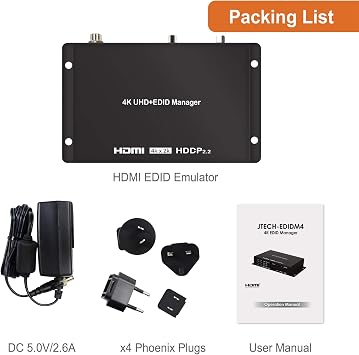
Easily Resolve EDID-Related Issues with the JTECH-EDIDM4 4K@60Hz HDMI EDID Emulator/Manager.

Fast
Shipping

Free
Return*

Secure Packaging

100% Original Products

PCI DSS Compliance

ISO 27001 Certified



Note: Step Down Voltage Transformer required for using electronics products of US store (110-120). Recommended power converters Buy Now.


What Stands Out
High Resolution
Supports 4K at 60Hz with 4:4:4 chroma, ensuring exceptional image quality for detailed displays in gaming and professional video editing.
Multiple Functions
Offers four versatile EDID functions: read, write, emulation, and bypass, enabling users to tailor their display setups according to specific needs and preferences.
User-Friendly Interface
Incorporates OSD manual and a PC management tool, simplifying navigation and configuration, alongside HDCP indicator and CEC pass-through for seamless operation.
Product Details
| Product Dimensions (L x W x H) | 4.3 x 0.9 x 2.9 inches (10.9 x 2.3 x 7.4 cm) |
| Item Weight | 9.5 ounces (269.33 grams) |
| Item model number | JTECH-EDIDM4 |
| Date First Available | March 27, 2020 |
| Manufacturer | J-Tech Digital |
Who Should Buy?

-
AV Professionals
Ideal for audio-visual professionals managing multiple displays and ensuring proper EDID communication for optimal performance.
-
Home Theater Enthusiasts
Perfect for users wanting to maximize their 4K setup's capabilities, ensuring compatibility with various devices without issues.
-
Technical Users
Beneficial for IT specialists who need detailed EDID management and complex configurations for diverse hardware environments.

-
Casual Users
Not suitable for users with basic setups who may find the advanced features unnecessary or overly complicated.
Product Description
Have any Query? Chat with us
Customer Questions & Answers
-
Question:
What is the main purpose of the J-Tech Digital EDID Emulator?
Answer: The J-Tech Digital EDID Emulator primarily serves to manage Extended Display Identification Data (EDID). It allows devices like computers, projectors, and displays to communicate effectively. This process can prevent resolution issues and ensure the correct display of audio and video. For example, if a computer struggles to identify a monitor's capabilities, this emulator can help establish a stable connection, optimizing the viewing experience. -
Question:
How does the J-Tech Digital EDID Emulator support 4K resolution?
Answer: This EDID Emulator supports 4K resolution at 60Hz and a color depth of 4:4:4, enabling high-definition video signals to be transmitted without compression. This capability is crucial for users who require high-quality visuals for gaming, graphic design, or professional video editing. The high bandwidth of 18Gbps ensures that even richly detailed content is displayed smoothly, avoiding lag or distortion. -
Question:
What does the 'Read' and 'Write' function in the emulator do?
Answer: The 'Read' function captures the EDID data from a connected display, while the 'Write' function allows users to apply specific EDID parameters to other devices. This feature is beneficial in scenarios where consistent video output is needed across multiple devices, such as in setups for presentations or digital signage. By customizing EDID settings, users can mitigate compatibility issues. -
Question:
Can I use this emulator for gaming setups?
Answer: Yes, the J-Tech Digital EDID Emulator is an excellent choice for gaming setups, particularly for high-end gaming rigs needing to maintain high resolutions. Its support for 4K at 60Hz ensures that gamers can enjoy stunning visuals without disruption. Additionally, it helps to eliminate common issues like screen flickering or no signal, maintaining a seamless gaming experience. -
Question:
What are the OSD Manual and HDCP indicators for?
Answer: The OSD Manual refers to the On-Screen Display interface, allowing users to adjust settings directly through their display. The HDCP Indicator shows whether the emulator is successfully engaging with HDCP-compliant devices, crucial for streaming protected content. This simplicity and functionality support users in troubleshooting any connection issues, ensuring a smooth setup process. -
Question:
What are the benefits of using the Bypass function?
Answer: The Bypass function allows users to connect devices without the emulator interfering with the EDID data, particularly useful for systems that require direct communication between the source and the display. This configuration comes in handy during multi-device setups, including live events or complex AV installations where maintaining direct input/output paths can optimize performance. -
Question:
How can I utilize the CEC (Consumer Electronics Control) function?
Answer: The CEC function enables control of multiple HDMI devices using a single remote, streamlining user experiences significantly. For instance, when connected to a smart TV and a Blu-ray player, users can navigate menus and switch inputs without needing individual remotes. This centralized control is perfect for home theater installations, enhancing convenience while using multiple devices. -
Question:
Is this product suitable for professional video editing?
Answer: Absolutely! The J-Tech Digital EDID Emulator is well-suited for professional video editing environments due to its high-resolution support and reliable EDID communication. Filmmakers and video editors can ensure that their editing monitors display accurate colors and resolutions, which is essential for color grading and final productions. This reliability significantly improves workflow efficiency. -
Question:
What is the significance of having multiple EDID functions?
Answer: Having multiple EDID functions, such as Read, Write, Emulation, and Bypass, provides users with versatility in managing how devices communicate with displays. This feature is significant for tech professionals or enthusiasts who frequently work with various configurations, allowing them to troubleshoot quickly and optimize setups for different scenarios with minimal hassle. -
Question:
Where can I buy the J-Tech Digital EDID Emulator in Ghana?
Answer: You can purchase the J-Tech Digital EDID Emulator from Ubuy, which offers a reliable platform for finding this product in Ghana. Ubuy provides a user-friendly shopping experience and a wide selection of electronic accessories, ensuring you can find exactly what you need without any complications.
J-Tech Digital Splitters JTECH-EDIDM4 Editorial Review
No editorial reviews found
Customer Reviews & Ratings
1 customers ratings
-
5 Star
100%
-
4 Star
0%
-
3 Star
0%
-
2 Star
0%
-
1 Star
0%
Review this product
Share your thoughts with other customers
Platform Trust & Buyer Confidence

MA
Mohammad
Verified buyer
“Excellent quality and original too,when ubuy send original things I will appreciate that ,I very satisfied thank you”
23 July 2026 · via Trustpilot
CK
Chitra
Verified buyer
“The order and delivery progress was communicated very well. Package arrived within the estimated time. Products arrived as expected in good condition.”
22-Jul-26 · via Trustpilot
K
kund
Verified buyer
“Good supply of products. Safe payment methods, and shipment worldwide! Genuine products.”
23-Jul-26 · via Trustpilot
OO
Onesi
Verified buyer
“Was my first time buying a product from Ubuy, but I found it so helpful. This is reliable. Gonna place a new order!”
22 July 2026 · via Trustpilot
SJ
SAO JOHN
Verified buyer
“Ubuy is a great online platform to buy stuff. Reliable, fast delivery time and great value for money. I've been using Ubuy online shopping platform for three years now and will continue to do so.”
23 July 2026 · via Trustpilot
Secure Checkout
Global Delivery
Easy Returns
Genuine Products
Product Price History
Important information
- Limitations : For products shipped internationally, please note that any manufacturer warranty may not be valid; manufacturer service options may not be available; product manuals, instructions, and safety warnings may not be in destination country languages; the products (and accompanying materials) may not be designed in accordance with destination country standards, specifications, and labeling requirements; and the products may not conform to destination country voltage and other electrical standards (requiring use of an adapter or converter if appropriate). The recipient is responsible for assuring that the product can be lawfully imported to the destination country. When ordering from Ubuy or its affiliates, the recipient is the importer of record and must comply with all laws and regulations of the destination country.
- Not all the products listed on Ubuy are for sale, as Ubuy is a global search engine. Products are subject to export/trade regulations.
GHS 4009
Order now and get it around Tuesday, September 15
This item is not restrict in my country.(Please click on above link if this item is not restrict in your country, So our team will review and allow.)
QTY:
Only 2 items left in stock.
Secured transaction
PCI DSS compliant and ISO 27001:2022 certified, with encrypted payments and full buyer protection on every order.
Our Top Logistics Partners
Fastest cross-border delivery
Features & Benefits
- Fix EDID compatibility problems between devices and displays effortlessly.
- Features 8 built-in EDIDs and customizable options for unique setups.
- Serves multiple functions: READ, WRITE, EMULATION, and BYPASS for flexibility.
- User-friendly OSD menu for easy selection of EDID modes and settings.
- Compatible with 4K UHD resolutions at 60Hz for stunning video quality.
- Includes a Windows-based management tool for enhanced EDID editing and analysis.
Ubuy Assurance
Experience worry-free shopping with 100% original products, PCI DSS-compliant payment security, ISO 27001-certified data protection, the fastest cross-border delivery, free returns *, and secure packaging on every order.