0 ratings




Item #:
78165802
Bootable USB Flash Drive Installer for Windows 11 Pro/Home
Item #:
78165802
GHS 543
Price Details
Excluding Shipping & Custom charges ( Shipping and custom charges will be calculated on checkout )
*All items will import from US
0 ratings
Write a review
In stock
 Imported from USA store
QTY:
Order now and get it around Tuesday, June 30
Secured transaction
Ubuy works hard to protect your security and privacy. Our advanced payment security system ensures confidentiality by encrypting your information during transmission using AES (Advanced Encryption Standards) and SSL (Secure Socket Layer) protocols. Your payment details are 100% secure as we do not share your payment details with third party sellers.
Our Top Logistics Partners


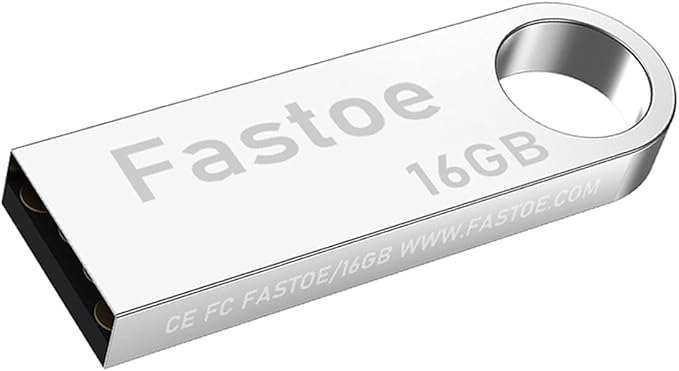
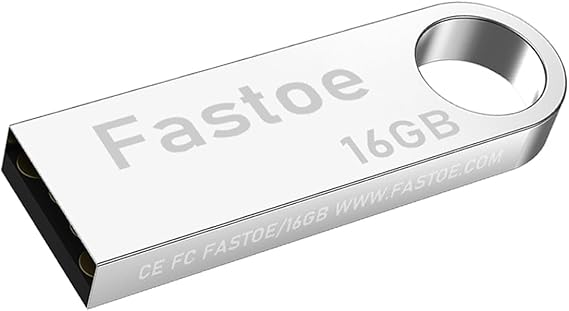
Fastoe Bootable USB Flash Drive Installer for Win 11 Pro/Home

Fast
Shipping

Free
Return*

Secure Packaging

100% Original Products

PCI DSS Compliance

ISO 27001 Certified


Note: Step Down Voltage Transformer required for using electronics products of US store (110-120). Recommended power converters Buy Now.


What Stands Out
User-Friendly Interface
The installer boasts a simple, intuitive interface that makes creating bootable USB drives quick and hassle-free, catering to users of all technical levels.
Fast Installation Speed
This tool ensures rapid data transfer speeds, significantly reducing the time needed to set up Windows 11 on your machine, enhancing overall efficiency.
Compatibility Assurance
Perfectly compatible with both Windows 11 Pro and Home editions, this installer eliminates frustration by seamlessly supporting diverse hardware configurations.
Product Details
- 16GB high-quality USB flash drive for reliability
- Deployed with the latest official original version of Windows 11
- Professional Windows 11 production tool ensures product quality
- Compatible with all PC brands, laptop or desktop, 64-bit
- Includes user guide and online technical support services
- Plug and play for easy installation
| Memory Storage Capacity | 16 GB |
| Hardware Interface | USB |
| Additional Features | Lightweight |
| Connectivity Technology | USB |
| Flash Memory Type | USB |
| Hardware Connectivity Technology | USB Type A |
| Compatible Devices | Desktop, Laptop |
| Color | Silver |
| Brand | Fastoe |
| Manufacturer | Fastoe |
| UPC | 653858940297 |
| Mfr Part Number | Win 11 Pro USB Installer |
| Model Number | Win 11 Pro USB Installer |
| Special Feature | Lightweight |
| Item Weight | 0.1 lbs (50 grams) |
Who Should Buy?

-
Tech Enthusiasts
Individuals who enjoy installing and experimenting with operating systems using USB drives will find this product beneficial.
-
IT Professionals
IT staff preparing systems for deployment will appreciate the convenience of a bootable USB installer for Windows 11.
-
Frequent Upgraders
Users who frequently upgrade their systems will benefit from a quick and efficient way to install Windows 11.

-
Casual Users
Non-technical individuals seeking a simpler installation method might find USB booting complicated and overwhelming.
-
Budget-Conscious Users
Users on a strict budget may find DIY installation more cost-effective than purchasing a ready-made bootable USB.
-
Non-Windows Users
Individuals primarily using non-Windows operating systems won't benefit from a Windows 11 installer on USB.
Product Description
About This Item
Introducing the Fastoe Bootable USB Flash Drive Installer for Windows 11 ProHome. Upgrade your operating system with ease using this powerful and convenient bootable USB installer. Whether you're a professional or a home user, this Fastoe Bootable USB Installer is designed to make the installation process seamless and efficient.
Experience the latest features and enhancements of Windows 11 ProHome, with its sleek design and improved performance. This bootable USB installer allows you to easily install and set up Windows 11 ProHome on your computer, ensuring that you get the most out of your operating system. With the Fastoe Bootable USB Flash Drive, you can enjoy the benefits of a clean installation of Windows 11 ProHome. Say goodbye to the hassle of upgrading your operating system through complex and time-consuming methods.
This USB installer provides a straightforward and user-friendly solution, allowing you to quickly and easily install Windows 11 ProHome in just a few simple steps. No need to worry about compatibility issues or complicated installation procedures. The Fastoe Bootable USB Flash Drive Installer is specifically designed for Windows 11 ProHome, ensuring a smooth and trouble-free installation. It's a convenient tool for both new users and experienced professionals, making it the perfect choice for anyone looking to upgrade their operating system. Upgrade to Windows 11 ProHome and enjoy its advanced features, including an intuitive user interface, improved multitasking capabilities, enhanced security features, and so much more.
With the Fastoe Bootable USB Flash Drive Installer, you can experience all of these benefits without any hassle or frustration. Don't miss out on this opportunity to enhance your computing experience. Get the Fastoe Bootable USB Flash Drive Installer for Windows 11 ProHome today and take your operating system to the next level. Upgrade with ease and efficiency, and enjoy all the exciting features that Windows 11 ProHome has to offer.
Have any Query? Chat with us
Customer Questions & Answers
-
Question:
What is a Bootable USB Flash Drive Installer for Windows 11 Pro/Home?
Answer: A Bootable USB Flash Drive Installer for Windows 11 Pro/Home is a USB drive that contains the installation files necessary to install or upgrade to Windows 11. This drive allows users to boot their computers directly from the USB to begin the installation process. Using a USB installer is particularly useful for computers that do not have a DVD drive or for those wanting a quicker installation process. It's an ideal solution for tech enthusiasts who build their own PCs or for anyone looking to recover or reinstall the operating system. -
Question:
How do I use the Bootable USB Flash Drive Installer?
Answer: To use the Bootable USB Flash Drive Installer, you need to insert the USB drive into your computer and restart it. During boot-up, access your BIOS or UEFI settings to select the USB as the primary boot device. Once set, your computer will boot from the USB, prompting you to follow the on-screen instructions to install or upgrade to Windows 11. This method is highly efficient for users wanting a fresh start with their operating system or resolving software issues. -
Question:
Is the Bootable USB Flash Drive Installer compatible with all computers?
Answer: Yes, the Bootable USB Flash Drive Installer for Windows 11 Pro/Home is compatible with most modern computers that meet the hardware requirements for Windows 11. It's essential to check that your device can run the new operating system, including the TPM 2.0 and Secure Boot features. This compatibility makes it a versatile option for users upgrading across various devices, ensuring access to the latest features and security updates. -
Question:
Can I use the Bootable USB Flash Drive Installer for a clean install of Windows 11?
Answer: Absolutely! The Bootable USB Flash Drive Installer is designed for users who want to perform a clean installation of Windows 11. This means wiping your existing operating system and data before installing a fresh version of Windows 11, which can help improve performance and resolve issues. This is often favored by users looking to optimize their system or those transitioning from older versions of Windows. -
Question:
How do I create a Bootable USB Flash Drive Installer for Windows 11?
Answer: To create a Bootable USB Flash Drive Installer for Windows 11, you'll need a USB drive and access to the Windows Media Creation Tool. Download the tool, select 'Create Installation Media,' choose the USB option, and follow the on-screen instructions. This will download the necessary files directly onto the USB drive. This DIY method is popular among tech-savvy individuals who prefer to customize their installations or create multiple installations for use on different machines. -
Question:
What are the advantages of using a USB installer over a DVD installer?
Answer: Using a USB installer offers several advantages over a DVD installer, including faster installation speeds and the ability to store multiple operating systems on one USB drive. USB drives are generally more durable than DVDs and less prone to damage. Furthermore, virtually all modern computers support USB booting, making this method more universally applicable. For professionals or gamers frequently installing operating systems, a USB installer can streamline their workflow significantly. -
Question:
Will I need a product key for Windows 11 installation using the USB installer?
Answer: Yes, a valid product key is required for the Windows 11 installation process when using the Bootable USB Flash Drive Installer. The product key verifies your copy of Windows and ensures that you receive updates and support. This requirement is vital for compliance, and it applies whether you're upgrading from a previous version or performing a clean installation. Having your product key readily available simplifies the installation process. -
Question:
Is it possible to use the Bootable USB Flash Drive Installer for recovery purposes?
Answer: Yes, the Bootable USB Flash Drive Installer can be used for recovery purposes. If your system fails to boot or encounters severe issues, inserting the USB drive can provide access to recovery tools. You can repair the startup, restore from a previous backup, or reinstall Windows without affecting your personal files. This functionality makes it an invaluable tool for both casual users and IT professionals looking to manage and recover systems effectively. -
Question:
Can I update Windows 10 to Windows 11 using the Bootable USB Installer?
Answer: Yes, you can update Windows 10 to Windows 11 using the Bootable USB Flash Drive Installer. During the installation process, you'll have the option to keep your files and applications or perform a clean install. This flexibility allows users to choose their preferred method based on their needs. It's particularly beneficial for those wanting to upgrade seamlessly while retaining their settings and data. -
Question:
Where can I buy a Bootable USB Flash Drive Installer for Windows 11 Pro/Home?
Answer: You can purchase a Bootable USB Flash Drive Installer for Windows 11 Pro/Home at Ubuy. Ubuy is a reputable online retailer offering a variety of tech products, ensuring you receive a reliable installer tailored for your needs. The convenient online platform allows you to browse options easily and ensures you get the right product for your Windows 11 installation.
Fastoe USB Flash Drives Win 11 Pro USB Installer Editorial Review


No editorial reviews found
Customer Reviews & Ratings
38 customers ratings
-
5 Star
60%
-
4 Star
8%
-
3 Star
18%
-
2 Star
0%
-
1 Star
14%
Review this product
Share your thoughts with other customers
Pros
- Easy Windows 11 installation
- Supports both Pro and Home versions
- High-speed USB 3.0 transfer
- Preloaded with drivers and updates
- Compact and portable design
Cons
- Limited to Windows installations
Product Price History
Important information
- Limitations : For products shipped internationally, please note that any manufacturer warranty may not be valid; manufacturer service options may not be available; product manuals, instructions, and safety warnings may not be in destination country languages; the products (and accompanying materials) may not be designed in accordance with destination country standards, specifications, and labeling requirements; and the products may not conform to destination country voltage and other electrical standards (requiring use of an adapter or converter if appropriate). The recipient is responsible for assuring that the product can be lawfully imported to the destination country. When ordering from Ubuy or its affiliates, the recipient is the importer of record and must comply with all laws and regulations of the destination country.
- Not all the products listed on Ubuy are for sale, as Ubuy is a global search engine. Products are subject to export/trade regulations.
GHS 543
Order now and get it around Tuesday, June 30
This item is not restrict in my country.(Please click on above link if this item is not restrict in your country, So our team will review and allow.)
QTY:
Secured transaction
Ubuy works hard to protect your security and privacy. Our advanced payment security system ensures confidentiality by encrypting your information during transmission using AES (Advanced Encryption Standards) and SSL (Secure Socket Layer) protocols. Your payment details are 100% secure as we do not share your payment details with third party sellers.
Our Top Logistics Partners
Fastest cross-border delivery
Features & Benefits
- Reliability: Built with 16GB high quality USB flash drive.
- Latest Version: Deployed with the latest official original version of Windows 11, no viruses, no spyware, 100% clean.
- Professional: Using professional Windows 11 production tool to ensure product quality.
- Compatibility: Compatible with all PC brands, laptop or desktop, 64-bit, Dell Latitude 3350, HP, Sony, Lenovo, Samsung, Acer, Toshiba and more.
- Plug & Play: Includes user guide and online technical support services. Plug it in and you're ready to go.